What’s new in Timers & Alarms 1.4
Timers & Alarms 1.4 is available on the App Store, as always free, with no ads and no tracking. It adds a third tab: a stopwatch with laps that also shows up on your Lock Screen and your Apple Watch. And your timers now work in the Shortcuts app and can be found in Spotlight.
A stopwatch with laps
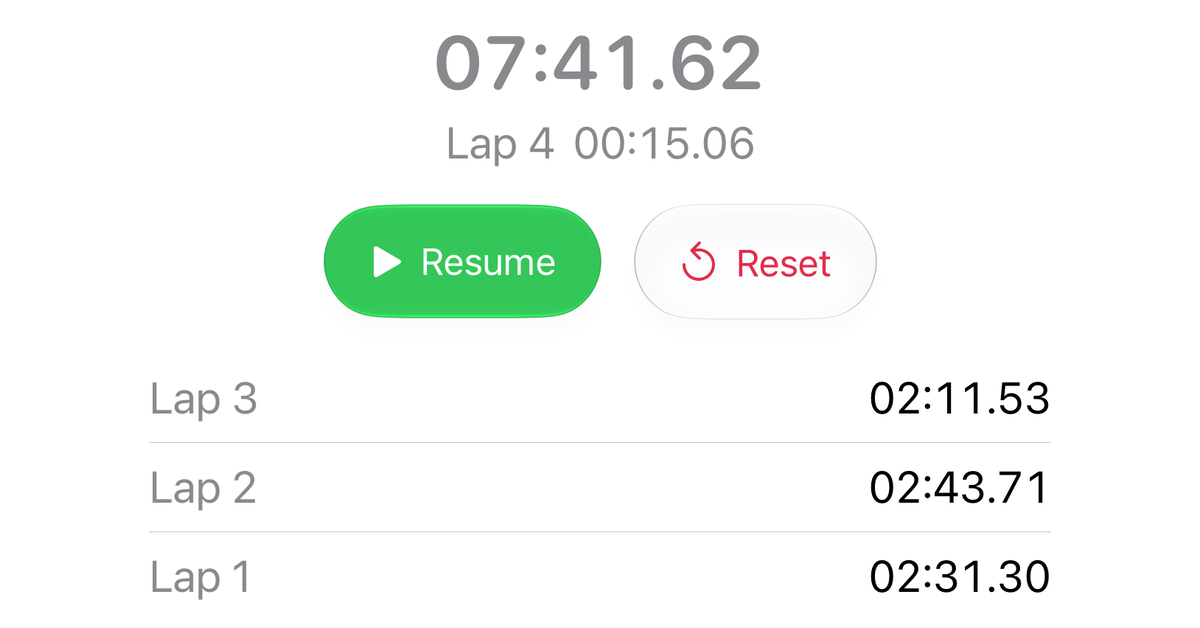
The new Stopwatch tab sits next to Timers and Alarms. It counts up from zero and measures how long something takes — there is no duration to set, and nothing rings at the end. Tap the flag button to take a lap. Each lap is listed with its own time, the newest at the top, and the line under the total shows the lap in progress.
A running stopwatch keeps going when you switch tabs or leave the app, and even when you restart your iPhone. When you come back, it shows all the time that has passed. It does that by remembering when it started instead of counting in the background, so it costs no battery.
On the Lock Screen and on Apple Watch
While the stopwatch is running or paused, it appears as a Live Activity on the Lock Screen and in the Dynamic Island, just like a running timer — with the same two buttons as in the app. If you wear an Apple Watch, the same card shows up in its Smart Stack. There is no separate watch app to install.
To start the stopwatch without opening the app, add the new Stopwatch control to Control Center, the Lock Screen or the Action button. The help page has the details.
Timers in Shortcuts and Spotlight
Timers & Alarms now brings its own actions to the Shortcuts app. With them you can:
- start one of your saved timers, or a quick timer for the minutes and seconds you enter
- stop a running timer
- check how much time a timer has left
- move an interval timer on to its next round when it rings
- turn an alarm on or off
You pick the timer or alarm from a list rather than typing its name, and the actions do their work without opening the app. Combine them with other actions for your own automations.
Two more actions are there for building shortcuts: one hands you all your saved timers, the other everything about one of them — its round, its phase and each duration you set.
Your timers also appear in Spotlight search, findable by the names you gave them. The help page describes each action.
Improvements
- In landscape, timers and alarms now line up as a grid of cards wherever two fit side by side, and a timer’s detail view spreads out into columns.
- Besides swiping, you can now delete a timer or alarm from its context menu: press and hold the card, then choose Delete.
- The onboarding and the in-app help now cover the stopwatch as well.
Fixed
- An interval timer started from a widget now plays the sounds you chose for its individual phases. Before, it always played the same sound.
- On the last round of an interval timer with a cool-down, “Continue” on the Lock Screen now starts the cool-down phase. Before, it did nothing and the alert stayed on screen.
Get the update
Tap the badge below, then open the page in the App Store app. If Timers & Alarms is already installed, the update arrives on its own.