Pencil notes, not pencil marks — a word that changed the app
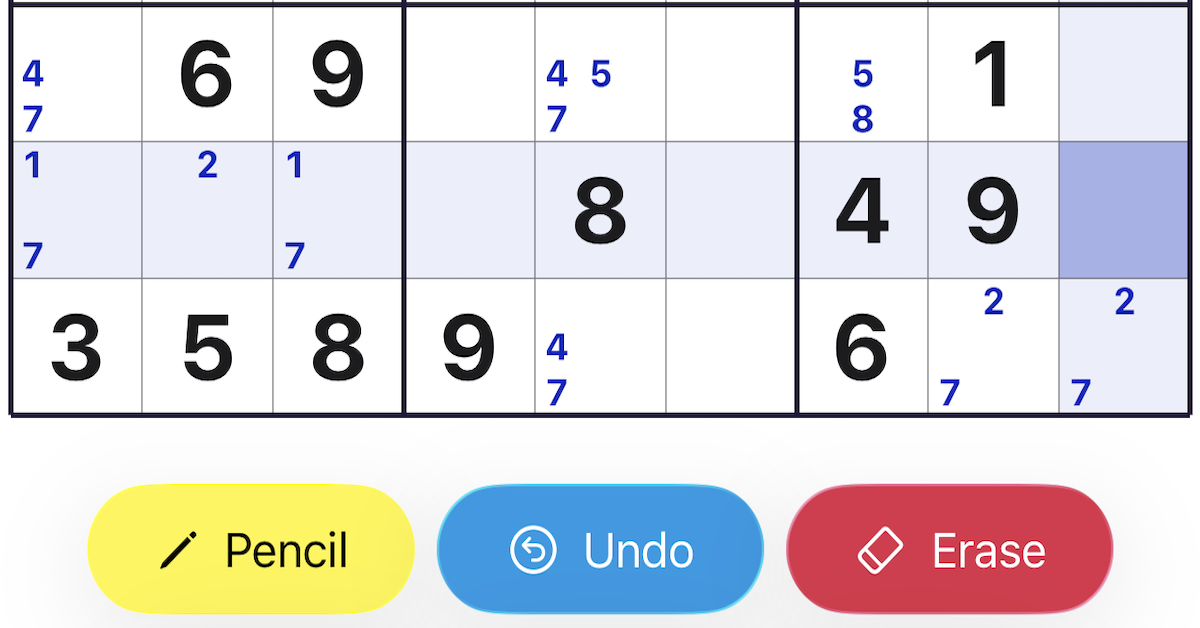
The small digits you pencil into a Sudoku cell were called pencil marks in this app for most of its development. They are not anymore. They are pencil notes now, and changing that one word touched more of the app than I expected — dozens of strings, the entire help guide, and, in the end, the way I think about the feature itself.
The two terms in the wild
“Pencil marks” and “candidates” come straight from Sudoku books, forums, and a lot of other apps. They are not wrong. An experienced solver reads “pencil marks” and knows exactly what is meant. I used the phrase without thinking, the way everyone does.
What I noticed reading it aloud
The German caught it first. “Bleistiftmarkierungen” sounded like a setting on a machine — something a printer does to a page. “Bleistiftnotizen” sounded like something a person does with a pencil. The English carried the same split: a mark is something you make; a note is something you write down to remember. One word is mechanical, the other is human.
What changed
So I renamed it everywhere — the button, the help paragraphs, the settings copy, this blog. One word stayed: candidate. That is still the right name for the mathematical idea, the digits that remain legal in a cell. But the thing you tap the pencil button to write is a note, not a candidate, and not a mark.
What it changed beyond the words
The rename did more than tidy the vocabulary. It made the app easier to explain. I no longer have to tell you what the little numbers are — you have written notes before, in the margin of a book or on the back of your hand. Onboarding lost a sentence, because the word was already doing the explaining.
The lesson
In a calm app, the words are the scaffolding everything else stands on. Pick the wrong one and you spend your time apologising for it in tooltips and help text. Pick the right one and the feature explains itself. “Pencil notes” was a small change, and an easy one to skip. I am glad I read it aloud.
Get it
Sudoku is free on the App Store, with no ads and no tracking. Tap the badge below to install it.