PhotoView is now in public beta
Updated on September 22, 2026: The public beta has ended. Thank you to everyone who tested PhotoView and sent feedback. From September 29, 2026, PhotoView is available on the App Store for iPhone and iPad and on the Mac App Store. Until then, you can pre-order it.
Every photo remembers how it was made. I built PhotoView to show it. PhotoView is now in a free public beta on iPhone, iPad and Mac, and you are invited to try it and help shape the first release.
See the photo, then see how it was made
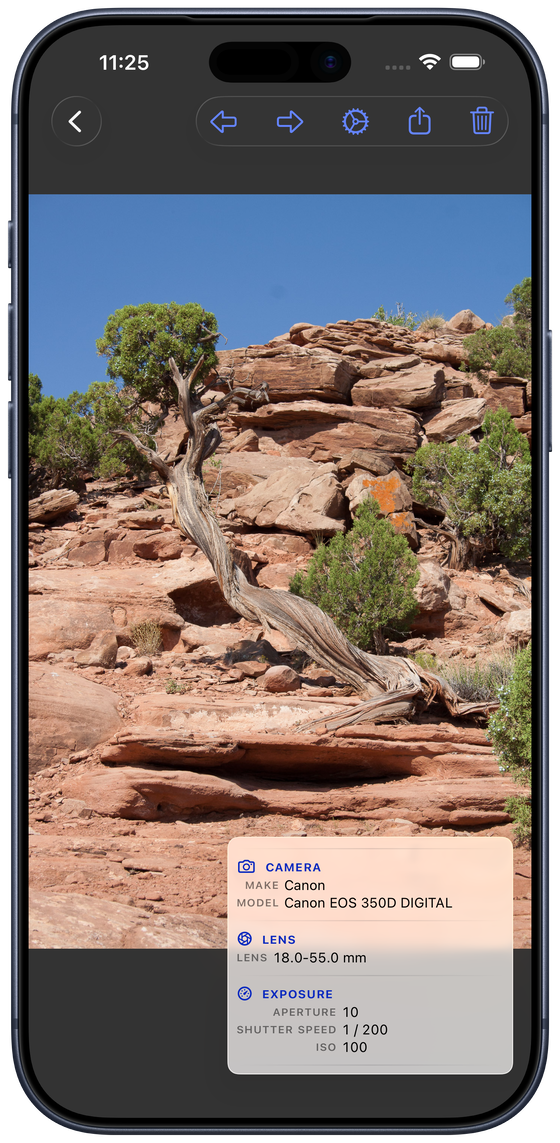
PhotoView is a full-screen viewer for the photos and videos already in your Photo Library. Browse your whole library, smart albums, your own albums and shared albums. Tap any photo, Live Photo or video to fill the screen, swipe between them, pinch to zoom, and double-tap to reset. When you want to know more, one tap brings up a tidy overlay with the metadata: the settings the shot was taken with, the lens, the time, and where it was taken. Tap again and the overlay is gone. It is just the photo.
The overlay is yours to arrange
A long list of values might bury the few numbers you actually care about. So you choose which fields appear, and you move or resize the panel with a drag or a pinch or you set size and position in the app settings. Keep the overlay small in one of the corners or enlarge it to see more details. It stays where you put it, over every photo you open.
More on each platform
On iPhone and iPad you can AirPlay a photo, a video or a whole slideshow to an Apple TV, so everyone can relive a trip on the big screen while you keep the controls in your hand. Only the media appears on the TV, never the toolbar or the overlay. On a Mac you can open original files straight from a folder, drag photos in and out of the Finder, and read the XMP your editor wrote: star ratings, color labels, the whole keyword tree, even the .xmp sidecar next to a RAW file.
Free to test, and private by design
The beta is free, with nothing to buy while it runs. PhotoView is read-only and works offline. It never uploads or copies your photos, runs no server, and shows no ads and no tracking. Only your own settings can sync, and only through your private iCloud.
What happens after the beta
PhotoView will be free of charge in the basic version. A one-time purchase will enable support for the full set of metadata, a single Universal Purchase that covers your iPhone, iPad and Mac, with a free trial so you can try it before you buy and then own it for good. No subscription.
There is more about every feature on the PhotoView user guide, and the Contact page is the place to send a thought.
← Back to the blog