How to start any Sudoku
A blank Sudoku looks like it wants a clever idea. It doesn’t. Almost every puzzle opens with the same two moves, and both of them are just looking — no notes, no guessing, no technique with a name you have to memorise.
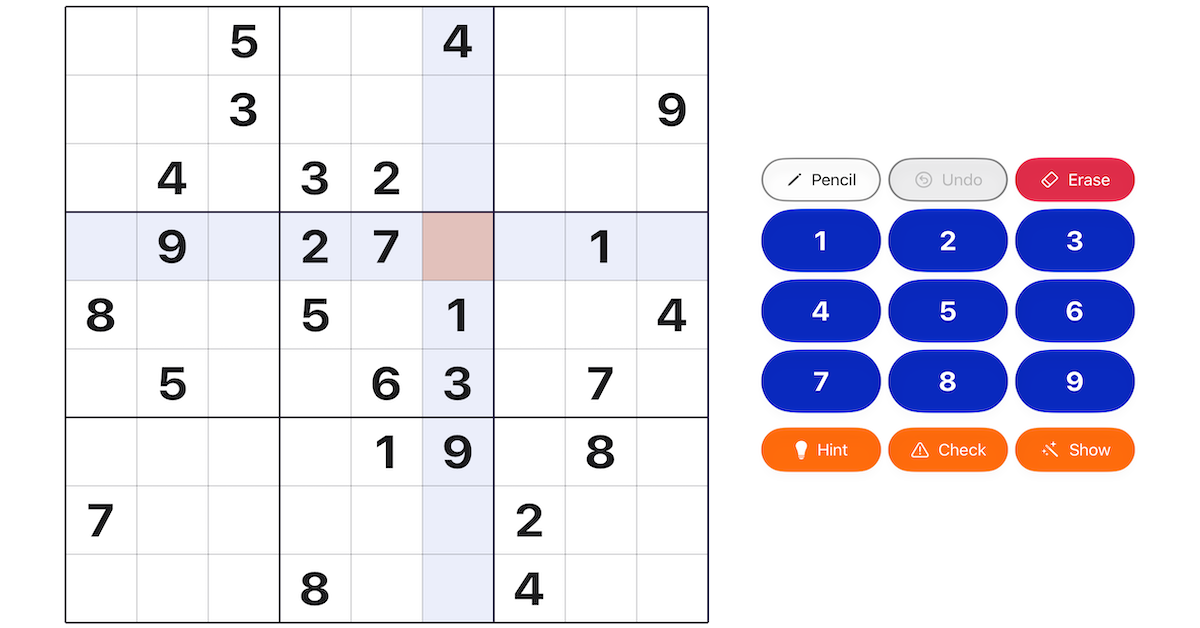
Start by reading, not writing. Before you touch the number pad, let your eyes travel along the rows, down the columns, and around the nine 3×3 boxes. You aren’t solving yet; you’re getting a feel for where the grid is crowded and where it’s empty. The crowded places are where the first digits fall, because the more a region is already filled, the fewer homes are left for what’s missing. There’s a shortcut for this in the app: with no cell selected, tap a digit on the number pad and every cell already holding that number lights up — so you can see at a glance where it still has room.
Ask where a digit can only go. Pick a digit — say the 1 — and look at a box that has none yet. Rule out every row and column that already holds a 1 elsewhere. Often that leaves a single empty cell in the box: the 1 has nowhere else to live, so it goes there. This is the most reliable opening move there is, and it needs nothing but the clues already on the board.
Then ask what a cell can only hold. The other direction is just as simple. Look at one empty cell and rule out every digit that already appears in its row, its column, or its box. If only one digit survives, that’s the answer. A cell hemmed in on three sides usually gives itself away.
Hold off on pencil notes. It’s tempting to fill every cell with candidates straight away. Resist it at the start — a board crowded with notes hides the easy moves you’d have seen just by looking. Notes earn their place later, once the obvious digits are in and the puzzle actually needs them.
If you’re stuck, the Hint button points the way. Tap Hint and it highlights a cell where progress is possible — and, by default, names the technique that cracks it, with a “Learn more” link to the full explanation. If you’d rather just be shown where to look and work the rest out yourself, switch the strategy callout off in Settings; then Hint only highlights the cell. Either way, it never fills the digit in. The first move was never about being clever; it’s about looking in the right place, and that’s a habit anyone can build.
Get it
Sudoku is free on the App Store, with no ads and no tracking. Tap the badge below to install it.